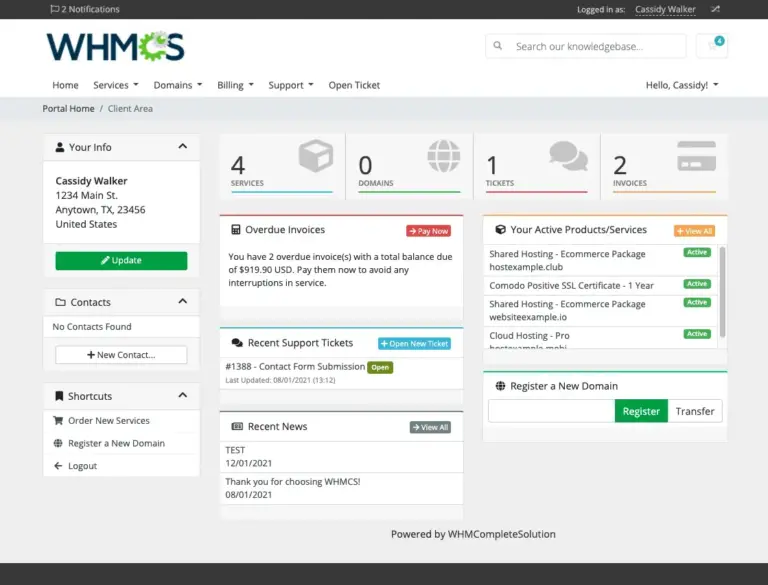
Automate the creation, configuration, and management of the VPS servers in your operation.
Robust infrastructure
Intel Xeon and AMD EPYC processors, ECC memory, and SSD NVMe storage.
WHMCS automation
Integrate sales, payments, and provisioning with the VPS Reseller module.
Complete System
Technology, automation, and performance to grow your VPS business
A ready-to-use infrastructure so you can focus on operations, customers, and sales.
Fast activation
The environment is automatically provisioned after payment confirmation.
Control panel
Create VMs, choose resources, and manage your infrastructure in one place.
Scalability
Allocate CPU, RAM, storage, and IP addresses according to your customers’ needs.
Optional backups
Add automatic remote backups and restore data when needed.
1Gbps network
High-speed connectivity with unlimited traffic and a fair usage policy.
KVM virtualization
Isolation, root access, and freedom to install and configure each virtual server.
Automatic installation
Most Popular Operating Systems
Select a ready-to-use image or upload your own ISO to create custom environments.
UbuntuUbuntu 26.04, 24.04, 22.04 and 20.04 LTSDebianDebian 13, 12 and 11AlmaLinuxAlmaLinux 10, 9 and 8Rocky LinuxRocky Linux 10 and 8Windows Server2025, 2022 and 2019FedoraFedora 42Oracle LinuxOracle Linux 9Custom ISOInstall your own ISO
Centralized control
Exclusive VPS Reseller Control Panel
Create, manage, and automate your entire infrastructure from a simple interface.
Your data center in one screen
From provisioning to resource monitoring
The control panel gives you autonomy to structure plans, manage servers, and monitor available capacity.
APIfor automation
noVNCintegrated console
MRTGusage graphs
Create and edit VPS
Install and reinstall systems
Boot, reboot, and shutdown
Manage password and storage
Monitor CPU and RAM
Check task history
Add or remove resources
Integrate with the WHMCS module
Branded experience
Complete control panel for your end customer
Give your customers the autonomy to manage their own VPS servers safely and easily.
Fewer operational tasks for your team
Your customer can monitor status, perform day-to-day actions, and view metrics without opening a support ticket.
Reboot serverChange passwordView usageAccess consoleReinstall systemTask history
White-label operationResell under your own brand and domain.
Sell and provision automatically
Free WHMCS license starting from Virtual DC 32GB
Connect your sales process to the reseller panel and automate service delivery.
Included with the plan
End-to-end automation
From payment to VPS deployment
The module integrates WHMCS with the reseller panel to reduce manual tasks and speed up service delivery to your customers.
WHMCS Starter license for up to 250 clients
Integration module with VPS Reseller
Automatic creation after payment confirmation
Customer panel access delivery
Operation under your own brand and domain
The Virtual DC 16GB plan does not include the license, but it can be ordered separately.
Data Centers and Connectivity Tests
Compare connectivity between São Paulo and Miami using our Looking Glass.
Check routes, test latency, and validate IPv4/IPv6 before ordering your dedicated server.
Essential information to plan, operate, and expand your virtual infrastructure.
What is a Virtual Data Center?
Virtual Data Center is a cloud infrastructure solution that allows you to create and manage multiple VMs, VPS servers, and Cloud Servers from a contracted pool of resources.
Instead of ordering separate virtual servers, you receive resources such as vCPU, RAM, storage, and IP addresses to distribute among virtual machines according to your operation’s needs.
It is a suitable option for companies, providers, agencies, developers, and resellers that want to offer VPS Cloud services with more autonomy and control.
How does Virtual Data Center work?
You receive a pool of vCPU, RAM, storage, and IP addresses. Within these limits, you can create and configure multiple VMs, which can be used as VPS servers or Cloud Servers for your customers.
Each VM can have its own configuration, respecting the resources available in the contracted plan.
Is Virtual Data Center a large VPS where I create other VPS servers?
No. Virtual Data Center is not a large VPS running other VPS servers inside it.
You receive access to a management panel with infrastructure resources, and the VMs are created directly on our KVM virtualization platform.
What is the difference between Virtual Data Center, VPS, and Cloud Server?
A VPS or Cloud Server is an individual virtual machine created with a specific amount of CPU, memory, disk, and IP resources.
Virtual Data Center is the environment where you can create multiple virtual machines. It works as a resource pool, allowing you to create VPS servers and Cloud Servers on demand, within the limits of the contracted plan.
In practice, Virtual Data Center is ideal for those who need to create and manage multiple VMs, while an individual VPS is better suited for those who need only one virtual server.
Can Virtual Data Center be used for VPS reselling?
Yes. Virtual Data Center is recommended for VPS reselling, as it allows you to create multiple VMs and assign them to your customers.
You can build your own VPS plans, define the resources of each virtual server, and deliver access to the end customer through a separate management panel.
This solution is ideal for those who want to sell VPS Cloud, Cloud Server, or virtual server services without investing in physical servers, virtualization licensing, networking, data center space, and infrastructure maintenance.
Can I create VPS servers and Cloud Servers in Virtual Data Center?
Yes. Inside Virtual Data Center, you can create VMs that can be used as VPS servers, Cloud Servers, application servers, testing environments, web servers, databases, website hosting, control panels, or other services.
Each VM can have a different configuration, respecting the resources available in the contracted plan.
This allows you to create smaller servers for simple projects or larger machines for applications that require more processing power, memory, or storage.
How many VMs can I create?
There is no fixed number of machines. You can create as many VMs as you want while there are available resources in your plan and each server meets the minimum required configuration.
To create a VM, you need at least 1 vCPU, 128MB of RAM, 1GB of storage, and 1 available IPv4 address.
Can I create VPS servers in São Paulo and Miami?
Yes. Depending on the plan and contracted region availability, you can create VPS servers in São Paulo, Brazil, or Miami, United States.
The São Paulo region is recommended for applications focused on users in Brazil, national websites, business systems, ERPs, online stores, and projects that require low latency for Brazilian users.
The Miami region is an excellent option for international projects, customers in Latin America, the United States, or applications looking for strong global connectivity with excellent cost-benefit.
Do I need a physical server to sell VPS?
No. With Virtual Data Center, you do not need to buy a physical server, rent rack space in a data center, configure virtualization, manage switches, routers, storage, or network infrastructure.
ServerSP provides the infrastructure base, virtualization, network, and management panel. You use the contracted resources to create VMs, VPS servers, and Cloud Servers for your customers.
This reduces the initial investment and allows you to start a VPS reseller operation in a simpler, scalable, and professional way.
What virtualization technology is used?
The VMs use KVM virtualization, with resource isolation, root/administrator access, and freedom to install the operating system and applications you need.
Does Virtual Data Center include a panel to manage customers?
Yes. Virtual Data Center includes a management panel for creating and managing VMs.
When creating a VM, you can assign it to an end customer, who will have access to a separate panel to manage their own virtual server.
The customer can perform actions such as power on, power off, reboot, access the console/noVNC, and reinstall the operating system, according to the available features and configured permissions.
Can I use WHMCS with Virtual Data Center?
Yes. WHMCS can be used together with Virtual Data Center to organize your sales operation, automate billing, manage customers, and sell VPS or Cloud Server plans.
Plans starting from Virtual DC 32GB include a WHMCS Starter license. On the Virtual DC 16GB plan, the license can be ordered separately.
The WHMCS license must be used on one of the VMs inside your Virtual Data Center. If you prefer, ServerSP can perform the installation for a one-time fee.
Is Virtual Data Center better than ordering multiple VPS servers separately?
It depends on your needs. If you only need one server, ordering an individual VPS may be enough.
Virtual Data Center is better suited for those who need to create multiple VPS servers, manage customers, resell virtual servers, or distribute resources across different projects.
With it, you have more flexibility to create VMs on demand, adjust resources as needed, and centralize the operation in a single management panel.
Who should order a Virtual Data Center?
Virtual Data Center is recommended for technology companies, internet providers, digital agencies, developers, IT consulting firms, hosting resellers, and businesses that want to create or resell VPS Cloud services.
It is also a good option for companies that need to separate internal environments, such as production, staging, development, databases, web applications, and customer servers.
With Virtual Data Center, you can centralize virtual server creation and scale the infrastructure according to demand.
Can I sell more resources than I have contracted?
No. The panel works with the real resources available in your plan. You can create and sell VMs while there are available vCPU, RAM, storage, and IP addresses in your Virtual Data Center.
If you need to grow, you can request an upgrade or additional resources, subject to technical availability.
Can I allocate all resources to a single VM?
Not necessarily. Just as there is a minimum configuration to create a VM, there are also maximum limits per virtual machine.
These limits exist to maintain platform stability and may vary depending on the region, contracted plan, and technical availability.
Which operating systems can I install?
The panel provides Linux and Windows operating system templates, depending on regional availability.
Commercial software such as Windows Server, cPanel/WHM, Plesk, and other licensed systems require a separate license, unless explicitly stated in the offer.
Are Windows Server, cPanel, or Plesk licenses included?
No. Commercial software requires its own license, which must be purchased, provided, and activated by the customer.
When a license is included in a specific offer, this information will be clearly highlighted in the plan description.
Does each VM receive IPv4 and IPv6?
Each VM requires at least 1 IPv4 address to be created. Plans include a number of IP addresses according to the contracted offer.
Additional IP addresses can be requested subject to technical availability and additional charges. IPv6 may also be provided depending on the region and the network’s technical policy.
Can I configure PTR/rDNS for the IP addresses?
Yes. PTR/rDNS configuration must be requested through ServerSP support.
To do this, provide the IP address and desired FQDN. Before configuration, the domain must have the corresponding A record pointing to the VM’s IP address.
Is outbound traffic on port 25 filtered?
Yes. We apply filtering on port 25 to prevent abuse, spam, and protect the reputation of our network.
If you need SMTP sending for a legitimate purpose, contact support to request release. All requests are reviewed before approval.
Does Virtual Data Center include DDoS protection?
Yes. The infrastructure includes basic protection against network-layer DDoS attacks, especially L3/L4, according to ServerSP’s mitigation policy.
For attacks that affect network stability or other customers, measures such as filtering, limitation, or temporary null-route may be applied.
For protection against application-layer attacks, such as HTTP/HTTPS attacks, we recommend using specific solutions such as Cloudflare or dedicated protection.
How does bandwidth usage and FUP work?
The connection is shared and subject to a Fair Usage Policy. The purpose of the FUP is to prevent constant network saturation and ensure good service quality for all customers.
Continuous usage that saturates the port, impacts the network, or affects other customers may result in limitation, corrective actions, or suspension of the offending service.
Is backup service included?
Automatic remote backup is optional and can be added to VMs that need an extra layer of protection and restoration.
The service can be ordered per VM, according to storage capacity, retention policy, and regional availability.
Can I order more resources?
Yes. You can request additional processing power, memory, storage, and IP addresses, according to technical availability.
Note: in KVM environments, storage downgrade may not be possible after disk expansion.
What is the speed and model of the vCPUs?
We use Intel Xeon and AMD EPYC processors, with infrastructure designed for high performance and stability.
Model, frequency, and performance availability may vary depending on the region, node, and contracted plan.
Is there a disk performance limit?
The VMs use SSD NVMe storage in RAID, offering strong performance and reliability for web applications, databases, control panels, and business environments.
To maintain stability among customers, I/O resources may have technical limits per VM. If you need dedicated or higher performance, contact our team for a custom analysis.
What happens when my Virtual Data Center resources run out?
When the plan resources run out, it will not be possible to create new VMs or increase existing machines until resources are available again.
In this case, you can remove unused VMs, reduce resources when technically possible, or request a plan upgrade.
Can I migrate my current VMs to Virtual Data Center?
Yes, it is possible to migrate existing servers to Virtual Data Center, but the process depends on the operating system, control panel used, data volume, and technical compatibility.
The migration can be performed by the customer or requested from the ServerSP team, subject to technical analysis and possible service fees.
Does ServerSP manage the created VMs?
No. Virtual Data Center is an unmanaged infrastructure service.
ServerSP provides support related to the network, platform availability, panel, virtualization, and connectivity. Administration of the VMs, operating system, applications, databases, internal security, updates, and end-customer configurations is the responsibility of the contractor.
How do I get support?
Support is provided by ticket through the ServerSP Client Area.
To speed up service, provide the service, VM IP address, region, error message, and, if possible, screenshots or logs related to the issue.
What is the refund policy?
We offer a 30-day Satisfaction Guarantee, according to the rules of the current policy.
For Virtual Data Center, this rule applies to plans that have not been released or were released in disagreement with the advertisement. Please review the Satisfaction Guarantee policy for all details and conditions.
How long does it take to activate my Virtual Data Center?
Activation usually takes place within a few minutes after confirmation of the first payment.
In some cases, orders may go through fraud review, manual validation, or technical verification before release.
Ainda precisa de ajuda?
Nossa equipe pode orientar na escolha do plano e dos recursos.
This website uses cookies to improve your experience. We hope you agree to this, but if you wish, you can opt-out. SettingsAccept
Privacy and Cookies Policy
Privacy Overview
This website uses cookies to improve your experience as you browse the website. Of these cookies, the cookies categorized as necessary are stored in your browser as they are essential for the functioning of the basic functionalities of the website. We also use third-party cookies that help us analyze and understand how you use this website. These cookies will be stored in your browser only with your consent. You also have the option to disable these cookies. Disabling some of these cookies may affect your browsing experience.
Necessary cookies are absolutely essential for the website to function properly. This category only includes cookies that ensure basic functionality and security features of the website. These cookies do not store any personal information.
Any cookies that may not be particularly necessary for the website to function and are used specifically to collect user personal data through analytics, advertisements and other embedded content are called non-necessary cookies. It is mandatory to obtain the user\'s consent before the execution of these cookies on your website.





 Ubuntu
 Debian
 AlmaLinux
 Rocky Linux
 Windows Server
 Fedora
 Oracle Linux
 Custom ISO